
How to Use a Coupon Code
If you have a coupon code, you can apply it during checkout to get a discount on your order. Follow the steps below.
How to Apply Your Coupon
- Add your product to the cart and proceed to checkout
- On the checkout page, look for the field that says Have a coupon? Click here to enter your code
- Click it — a text field will appear
- Type or paste your coupon code exactly as given
- Click Apply Coupon
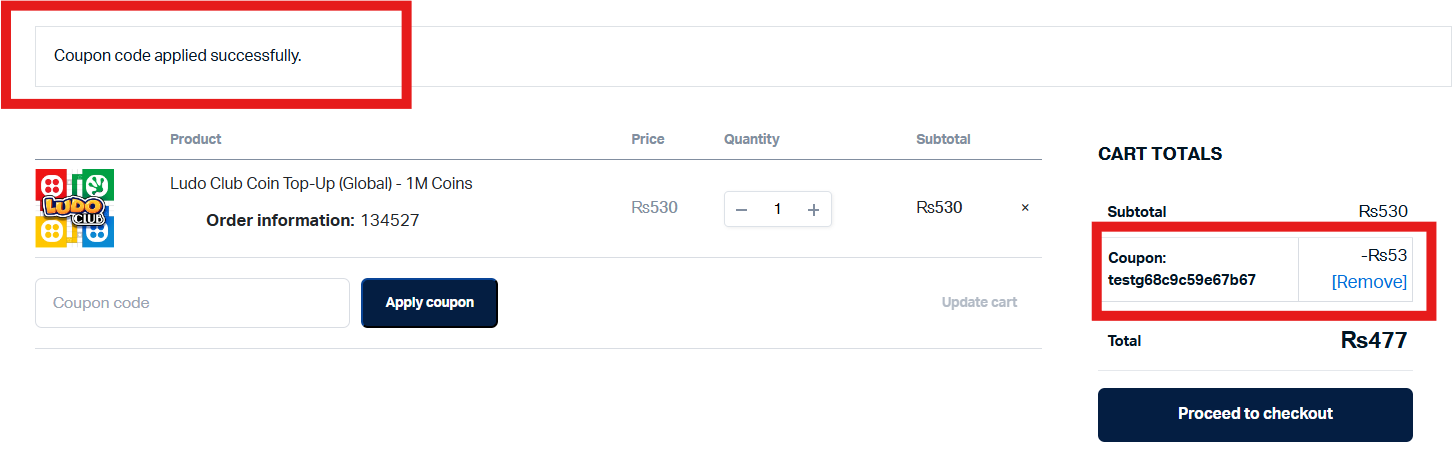
- Your discount will be applied and the order total will update automatically

If your coupon is valid, you’ll immediately see the discount applied to your total.
Things to Check if Your Coupon Is Not Working
- Make sure there are no extra spaces before or after the code when pasting it
- Check that the coupon has not expired
- Some coupons only apply to specific products or categories — confirm the coupon is valid for the item in your cart
- Coupons cannot be combined unless stated otherwise
- Each coupon can only be used once per account unless stated otherwise
We do not authorize any third-party websites or social media accounts to distribute Gate2Enter coupon codes. If a code came from an unofficial source, it may not be valid.
Still Not Working?
Contact us via Live Chat with your coupon code and the product you are trying to purchase and we will look into it for you.